The big idea: A prototype exists to answer a question before the product is committed to.
It can be physical or virtual (digital) — and which one you need depends entirely on what the question is.
Six real design questions, with a tick against whichever form can actually answer each.
Interactive diagram
Explore the labelled diagram, charts and maps for this topic in full study mode.
Free preview
This is the free notes preview
You're reading the free notes. Aimnova Pro unlocks the full study experience — and you can try it with your first topic free to keep:
- FlashcardsLock in vocabulary and key terms with spaced repetition.
- Practice questionsAnswer exam-style questions and get instant AI marking.
- Mock exams & past-paper vaultSit full mocks and see exactly how examiners award marks.
- Personalised study planA daily plan built around your exam date and weak areas.
Why designers prototype at all
To test an idea
Does the concept work? A prototype turns an opinion into an observation — and it does so while the answer is still cheap.
To gather feedback
Users cannot react to a description. Put something in their hands and they will tell you things no interview would have reached.
To communicate
A prototype settles arguments inside a team, and convinces clients and manufacturers in a way drawings do not.
To find problems early
Every fault found on a prototype is a fault not found in production, where it costs a tooling change rather than an afternoon.
In product development: Prototyping is not one step in the process — it runs through it. Early prototypes decide what to make; late ones decide whether it can be made.
Study smarter, not longer
Most students waste 40% of study time on topics they already know. Our AI tracks your progress and optimizes every minute.
Only physical
- Weight, balance and fatigue over time
- Texture, grip, temperature
- The sound and feel of a catch
- Anything the body judges
Only virtual
- Comparing forty variants
- Forces inside a part
- Anything needing a change to be free
- Testing before any material exists
Both, in sequence
- Structural failure — predict, then prove
- Assembly fit — simulate, then build
- Reach and clearance — model, then check
- Simulate to narrow, build to confirm
The trap: Answering "virtual is cheaper, so use virtual". A simulation tells you a handle weighs 180 grams. It cannot tell you whether that is tiring after ten minutes — and that was the question.
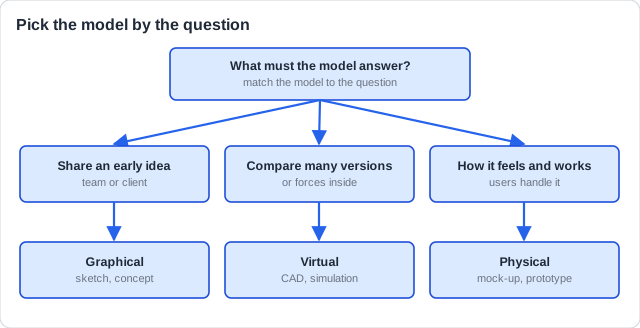
Three ways to model a design
Graphical model
Sketches and drawings in 2D or 3D. The first concept model of an idea is usually graphical: it lets the designer visualise and communicate the idea to the team or a client.
Physical model
A model you can hold and use: clay, card, foam, a scale model, a mock-up or a prototype. A full-size seat mock-up lets real users sit in it and say what is wrong.
Virtual model
A CAD model on screen (surface or solid), often with simulation. Many variants can be tried and shown to users before anything is built.
Prototype or mock-up?
A prototype works: it can carry out the tasks the final product will. A mock-up only looks and feels like the product; a scale model is a different size.
How this is tested — explaining the purpose of prototyping and choosing a form for a question. It comes up two ways:
Paper 1 — multiple choice
- Identify whether a stated question needs a physical or virtual prototype.
- Pick the purpose a described prototype serves.
Paper 2 — analysing a product
- Explain the purpose of prototyping in developing a named product.
- Explain why a designer would use both forms on one product.
The trap: Listing what each form is, rather than what each can answer. A question always states a purpose — match the form to the purpose.
A company is developing a lightweight folding bicycle helmet. Explain why it would use both virtual and physical prototypes.
Model answer plan
See the answer broken into clear points, with guidance on how each point earns marks.