Why not just one big fast store?: Because no such thing exists. Memory is either small and fast or big and slow — never both.
So a computer uses several, and keeps whatever it needs next in the fastest one.
Each bar's width is how much that store holds. Step through to see a cache hit, a cache miss, and what survives the power going off.
Interactive diagram
Explore the labelled diagram, charts and maps for this topic in full study mode.
The order to remember: Registers → cache → RAM → storage.
Each step down holds more and takes longer to reach.
Free preview
This is the free notes preview
You're reading the free notes. Aimnova Pro unlocks the full study experience — and you can try it with your first topic free to keep:
- FlashcardsLock in vocabulary and key terms with spaced repetition.
- Practice questionsAnswer exam-style questions and get instant AI marking.
- Mock exams & past-paper vaultSit full mocks and see exactly how examiners award marks.
- Personalised study planA daily plan built around your exam date and weak areas.
Registers
Inside the CPU, beside the ALU. Hold the handful of values being worked on right now — one value each.
Cache — L1, L2, L3
A small store of what was used recently, kept close by in case it is needed again. L1 is smallest and fastest, L3 largest and slowest.
RAM
Holds the programs and data in use now. Big enough for everything open, and cleared when the power goes off.
ROM
Read only and permanent. Holds the small program that starts the computer up, which must survive being switched off.
RAM and ROM are not a pair: The names look like opposites but the jobs are unrelated.
RAM is the big working space that empties. ROM is a tiny permanent store holding the start-up instructions.
When a question says "distinguish RAM and ROM": Set them side by side, one difference per line. Each line names both memories.
RAM
- Volatile — empties when the power goes off
- Read and write — its contents change all the time
- Holds the programs and data in use now
- Large — gigabytes
ROM
- Non-volatile — keeps its contents with no power
- Read only — normally never changed
- Holds the start-up instructions
- Small — just enough for start-up
Feeling unprepared for exams?
Get a clear study plan, practice with real questions, and know exactly where you stand before exam day. No more guessing.
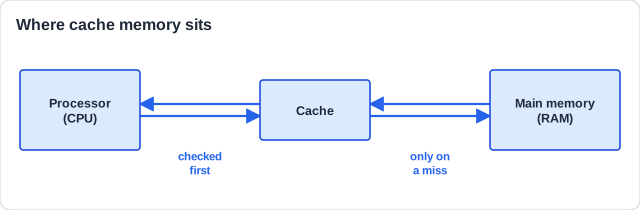
Look in the nearest place first: Before going to RAM, the CPU checks cache.
Cache hit — it is there, and the wait is short.
Cache miss — it is not, so the CPU fetches from RAM and copies it into cache on the way back.
A hit
- The value is already in cache
- No trip to RAM is needed
- The instruction finishes sooner
A miss
- The value is not in cache
- A slower trip to RAM is required
- The value is copied into cache, so next time hits
Why copying it back matters: Programs tend to use the same values again shortly afterwards. Copying a missed value into cache turns the next request into a hit — which is the whole reason cache works.
How this is tested — each store must be given a job NOTHING ELSE has, and hit/miss must be used correctly. It comes up two ways:
Paper 1 Section A
- Explain the purposes of the types of primary memory, 4-6 marks
- Define cache hit and cache miss
- Say why RAM is volatile and ROM is not
Paper 1 Section B — case study
- Explain why the case study's system needs more RAM or more cache
- Justify a storage choice from how that system is used
The classic trap: Writing that all of them "store data for the CPU". True, and worth one mark at most — the question asks what makes each one different.
Explain the purpose of registers, cache and RAM in a computer system, and explain what is meant by a cache miss.
Model answer plan
See the answer broken into clear points, with guidance on how each point earns marks.
Asked to draw where cache sits? A one-mark drawing: the cache goes BETWEEN the processor and RAM, joined to both.